Book a class with us
Trapeze Drop-In at FlightHouse
Information on Class LevelsClass Plan
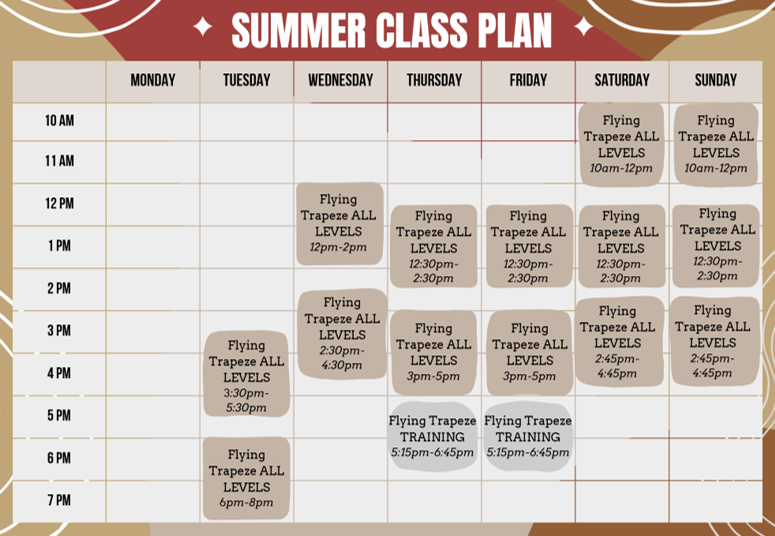
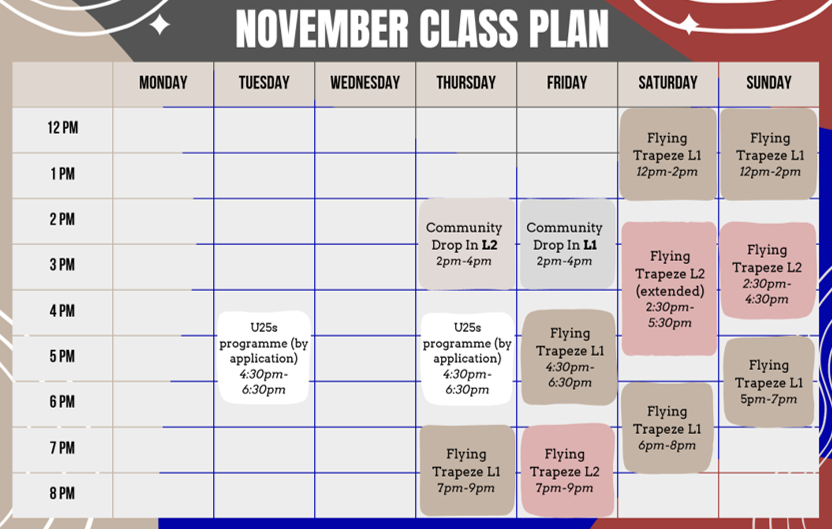
View our current timetables, then use the booking calendar below to reserve your place.
Exciting guest workshops and other events are not shown on the regular timetable, ensure you stay up-to-date with our Instagram account and newsletter.
If you fly regularly, you can also view our savings with multi-class bundles .
Having trouble viewing the booking system?
Open Booking SystemMulti-Class Bundles
Buy a Class Bundle
Flying regularly? Save when you book several classes at once with one of our multi-class bundles. Bookwhen calls these 'passes'.
How do I use my class pass?
Once you've purchased a pass, you can use the included tickets when booking eligible FlightHouse classes.
- Choose the class or classes you'd like to attend from our booking page.
- Log in to your Bookwhen account before completing checkout.
- Bookwhen will recognise any eligible passes linked to your account.
- Your available pass tickets will be applied to eligible bookings and removed from your total purchase price.
Being asked for a password you don't remember setting?
Occasionally Bookwhen may ask an existing customer to log in even if you don't remember setting a password when you originally booked. Simply use the password reset option on the login screen to set a new password.
You can then log in normally for future bookings and Bookwhen will recognise passes associated with your account.
Having trouble viewing the passes for the bundles? Open the FlightHouse Passes page directly.
Other questions and enquiries
Please use our contact form for all other questions and enquiries.
Contact